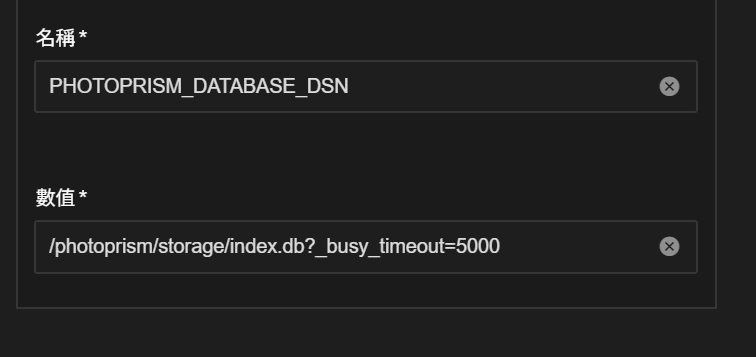
PhotoPrism was using SQLite3 as the default database on TrueNAS; however, it frequently displayed a ‘database is locked’ error.
The official documentation recommends switching to MariaDB, using an SSD, or configuring a database DSN.
Ref: https://docs.photoprism.app/getting-started/troubleshooting/sqlite
Ref: https://github.com/photoprism/photoprism/issues/392
Switching to MariaDB on TrueNAS is not easy, and the source code expects an empty string to be passed, which is not accepted by the TrueNAS web UI.
// DatabaseDsn returns the database data source name (DSN).
func (c *Config) DatabaseDsn() string {
	if c.options.DatabaseDsn == "" {
		switch c.DatabaseDriver() {
		case MySQL, MariaDB:
			databaseServer := c.DatabaseServer()

			// Connect via Unix Domain Socket?
			if strings.HasPrefix(databaseServer, "/") {
				log.Debugf("mariadb: connecting via Unix domain socket")
				databaseServer = fmt.Sprintf("unix(%s)", databaseServer)
			} else {
				databaseServer = fmt.Sprintf("tcp(%s)", databaseServer)
			}

			return fmt.Sprintf(
				"%s:%s@%s/%s?charset=utf8mb4,utf8&collation=utf8mb4_unicode_ci&parseTime=true&timeout=%ds",
				c.DatabaseUser(),
				c.DatabasePassword(),
				databaseServer,
				c.DatabaseName(),
				c.DatabaseTimeout(),
			)
		case Postgres:
			return fmt.Sprintf(
				"user=%s password=%s dbname=%s host=%s port=%d connect_timeout=%d sslmode=disable TimeZone=UTC",
				c.DatabaseUser(),
				c.DatabasePassword(),
				c.DatabaseName(),
				c.DatabaseHost(),
				c.DatabasePort(),
				c.DatabaseTimeout(),
			)
		case SQLite3:
			return filepath.Join(c.StoragePath(), "index.db?_busy_timeout=5000")
		default:
			log.Errorf("config: empty database dsn")
			return ""
		}
	}

	return c.options.DatabaseDsn
}

Finally, I resolved the issue by adding PHOTOPRISM_DATABASE_DSN in the 'Additional Environment Variables' section, using the default path of the SQLite3 database and the parameter expected by the solution